Today I’m introducing a small but powerful library for LibGDX: simple-save-gdx. It helps you serialize and deserialize your game’s data or state classes in a simple, lightweight way.
No JSON handling, no reflection hassle: Just plug it in and call Saves.read() or Saves.write().
🧩 What it does
simple-save-gdx provides a single static utility class called Saves, which lets you easily read and write objects to files, streams, or readers.
It supports both default serialization and custom serializers for complex objects.
You can register custom serializers for your own types. A serializer is an interface with two methods you need to implement:
T read(Reader reader);
boolean write(T value, Writer writer);
You can then register or unregister them at any time:
Saves.registerSerializer(MyType.class, new MyTypeSerializer());
Saves.unregisterSerializer(MyType.class);
🧠 Example project
The repository is a Gradle project with two modules: :library and :example.
To run the example:
gradle clean :example:run
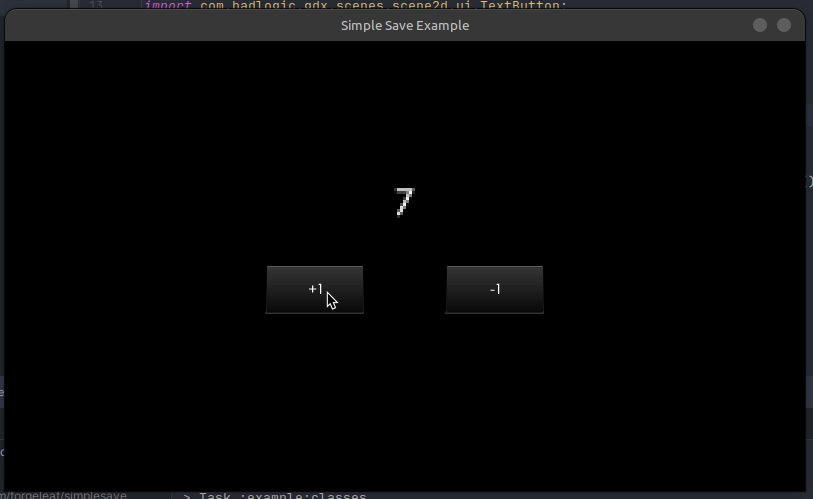
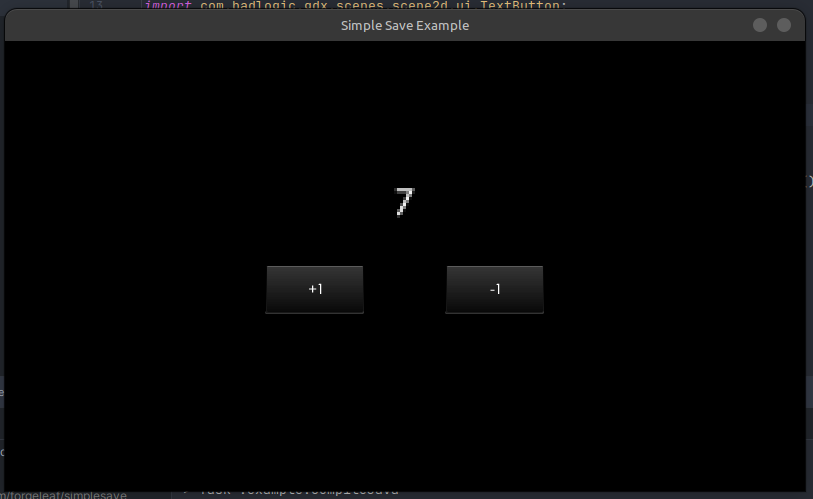
It opens a small window with two buttons: “+1” and “-1”. The counter value is saved automatically when you close the game and restored on next launch.
Here’s the main code:
package com.forgeleaf.simplesave.example;

import com.badlogic.gdx.ApplicationAdapter;
import com.badlogic.gdx.Gdx;
import com.badlogic.gdx.backends.lwjgl3.Lwjgl3Application;
import com.badlogic.gdx.backends.lwjgl3.Lwjgl3ApplicationConfiguration;
import com.badlogic.gdx.files.FileHandle;
import com.badlogic.gdx.scenes.scene2d.Actor;
import com.badlogic.gdx.scenes.scene2d.Stage;
import com.badlogic.gdx.scenes.scene2d.ui.Label;
import com.badlogic.gdx.scenes.scene2d.ui.Skin;
import com.badlogic.gdx.scenes.scene2d.ui.Table;
import com.badlogic.gdx.scenes.scene2d.ui.TextButton;
import com.badlogic.gdx.scenes.scene2d.utils.ChangeListener;
import com.badlogic.gdx.utils.ScreenUtils;
import com.forgeleaf.simplesave.Saves;

public final class SimpleSaveExample extends ApplicationAdapter {

	public static void main(String[] args) {
		Lwjgl3ApplicationConfiguration config = new Lwjgl3ApplicationConfiguration();
		config.setWindowedMode(800, 450);
		config.setTitle("Simple Save Example");
		config.setResizable(false);
		new Lwjgl3Application(new SimpleSaveExample(), config);
	}

	private Stage stage;
	private Skin skin;
	private Label label;
	private FileHandle stateFile;
	private State state;

	@Override
	public void create() {
		stateFile = Gdx.files.local("state.json");
		if (stateFile.exists())
			state = Saves.read(State.class, stateFile);
		else
			state = new State();

		stage = new Stage();
		skin = new Skin(Gdx.files.internal("uiskin.json"));

		Table root = new Table();
		root.setFillParent(true);

		label = new Label(String.valueOf(state.count), skin);
		label.setFontScale(3);
		root.add(label).colspan(2).row();

		TextButton increaseButton = new TextButton("+1", skin);
		increaseButton.addListener(new ChangeListener() {
			@Override
			public void changed(ChangeEvent event, Actor actor) {
				state.count++;
				label.setText(String.valueOf(state.count));
			}
		});
		root.add(increaseButton).pad(40f).size(100f, 50f);

		TextButton decreaseButton = new TextButton("-1", skin);
		decreaseButton.addListener(new ChangeListener() {
			@Override
			public void changed(ChangeEvent event, Actor actor) {
				state.count--;
				label.setText(String.valueOf(state.count));
			}
		});
		root.add(decreaseButton).pad(40f).size(100f, 50f).row();

		stage.addActor(root);
		Gdx.input.setInputProcessor(stage);
	}

	@Override
	public void render() {
		ScreenUtils.clear(0, 0, 0, 1);
		stage.act();
		stage.draw();
	}

	@Override
	public void dispose() {
		Saves.write(state, stateFile);
		stage.dispose();
		skin.dispose();
	}
}
And the state class:
package com.forgeleaf.simplesave.example;

public class State {
	int count = 0;
}
📸 Screenshots & GIFs
Initial launch, pressed the button 7 times:
And after closing and relaunching the “game”, the state will be saved:
🧾 Conclusion
simple-save-gdx makes it trivial to persist your game state in LibGDX. It’s tiny, dependency-free, and integrates seamlessly with LibGDX’s FileHandle system.
Perfect for small games, prototypes, or tools that need quick save/load functionality.
Bismillah. Hey everyone, today we’ll compare our favorite Java game framework, the famous LibGDX, with some of the other popular alternatives to find our what suits you best! I’ve separated…
Bismillah, dear readers!I hope you enjoyed the long weekend and managed to recharge. Today we’ll explore building a simple game using simple‑world‑gdx (my lightweight ECS for LibGDX), together with simple‑batch‑gdx…
Bismillah.Today, we’ll take a short detour from Forge and look at something written purely for LibGDX, a little helper library called SimpleBatch. If you’ve used LibGDX for any length of…
Forge is our free and open source game framework for the GoLang programming language. It is feature-rich and constantly improved. We designed Forge to be performant and simple for beginner, its power lies within its ecosystem and community. Forge is lightweight in nature and can be easily extended to fit most of your needs. Write you game logic in your way and let the framework handle compatibility.